Import a csv fil Email a csv-file with lists and tasks
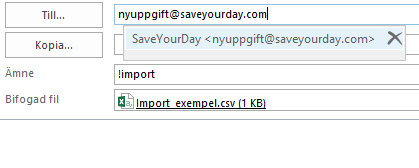
You can import a csv-file containing lists and task using email. It is therefore very simple to import your to-do list from Excel to SaveYourDay. You import by emailing a csv-list containing one task per row. You can also add the task to an existing list or even create a new list.
Step by step instructions to import tasks into SaveYourDay
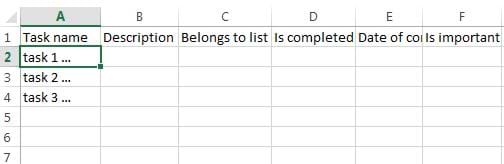
- Download the csv file Import.csv and open it in Excel. Do not change anything on the first row.
- Add every task in the first column from row 2 – one task per row..
- Add your choice of additional properties:
- (B) Task description.
- (C) List for the current task.
- (D) If the task is completed, add ”TRUE”. False = dafault.
- (E) Add date when the task was completed. Format: YYYY-MM-DD.
- (F) In case the task is important add ”TRUE”. False = default.
- (G) In case you wish to create a new list, add the name in column A and ”TRUE” in column G “Create list”.
- (H) Task context (has to be an existing context in your SaveYourDay account).
- (I) Start date. Format: YYYY-MM-DD.
- (J) Deadline. Format: YYYY-MM-DD.
- (K) Task creation date is automatically set to the current date.
- (L) In case the task shall be completed urgently, add ”TRUE”. False = default.
- Email the file to SaveYourDay:
- Sender = the email address you use to login to SaveYourDay
- Receiver - nyuppgift@saveyourday.com or newtask@saveyourday.com
- Subject - !import
- Remove everything else from the email, such as additional text and signatures
- If you misspell for example a list name, the tasks will end up in the inbox.
If you want to know more, please download the example.